Showing posts with label Networking. Show all posts

Monday, 25 May 2026

Unifi Doorbell -> BlueIris

Getting a UniFi Doorbell into Blue Iris (the hard way, because the easy way broke)

I use Blue Iris as my primary CCTV platform, but like many home lab tinkerers, I also have some UniFi kit in the mix. In this case, a UniFi doorbell camera managed by UniFi Protect on a UDM-Pro.

On paper, this should be easy. UniFi cameras can expose RTSP streams. Blue Iris can ingest RTSP streams. Job done.

Except, as usual, it wasn't quite that simple.

Wednesday, 13 May 2026

Building a Home Energy Dashboard with Node-RED, MQTT, InfluxDB and Grafana

I recently started building a local energy monitoring dashboard for my home solar setup. The goal was to take live data from my Solis inverter, process it in Node-RED, publish it through MQTT, store it in InfluxDB, and visualise it in Grafana.

This post outlines the first working version of that setup, and is a continuation of the initial retrieval of data from Solis into NodeRed


The Overall Architecture

The final data path looks like this:

Solis inverter
  ↓
Modbus TCP
  ↓
Node-RED
  ↓
MQTT / Mosquitto
  ↓
InfluxDB
  ↓
Grafana

The idea is to keep MQTT as the central message bus. Node-RED reads and decodes the inverter data, publishes useful values to MQTT, and also writes those values into InfluxDB for historical storage. Grafana then reads from InfluxDB to provide dashboards and charts.

Monday, 11 May 2026

Importing Solis Inverter Data to Node Red

I wanted a reliable way to pull live data from my Solis hybrid inverter into Node-RED. The goal was not just to view the same information shown in SolisCloud, but to make the data available locally for dashboards, automation, MQTT, Home Assistant / Homey, and eventually longer-term graphing in something like Grafana.

The SolisCloud app is useful, but it is not ideal for automation. It can lag by several minutes, and the values shown in the app are not always updated at the same moment. For automation, I wanted local data directly from the inverter/datalogger path.

This is what I ended up with;


Wednesday, 7 August 2024

VirtualHere on piCorePlayer

This is niche...

I'm in the middle of building a DIY music streamer based around piCorePlayer on a Raspberry Pi with a HiFiBerry Digi+ Pro HAT. This will live in my main AV rack and output to my AV Processor.

I selected PiCorePlayer as I already run a Logitech Media Server (LMS) and have a few squeezebox devices, so that OS is a good fit for me.

I also have an Elgato StreamDeck that I purchased some time ago that I'd like to use in my Home Cinema. This device has a bunch of customisable buttons that I intend to configure with shortcuts for lighting, av system power etc. 

The issue I have is that the StreamDeck needs to be plugged in to a PC via USB for configuration and operation. I don't have a PC nearby, and would ideally like to manage it from a Virtual Windows machine, but that runs on my Unraid server in a different building.

It would be great to be able to use the Pi in my DIY streamer to somehow relay the StreamDeck to my VM.

I came across some VirtualHere software that appeared to do just that. This runs a 'server' on a computer that you can plug USB devices into, and a 'client; on a remote machine. The client can connect to the USB devices as if they were local. 

There is a linux/arm server for PIs available, and a Windows client. The problem is how to install it on PiCorePlayer, which is based on Tiny Core Linux (TCL), and while it supports extensions and the like, is fairly locked down, and ultimately runs in RAM with no persistent storage out of the box.

It took a while, but I finally came up with a somewhat bodged solution.....

Tuesday, 11 June 2024

Migrating Deprecated Unifi Docker on unRaid

I've been using LinuxServer's Unifi-Controller docker for a long time to manage my unifi devices. However, this has been deprecated and to keep up with new releases, there is a requirement to install a Mongo database docker and a newer Unifi docker. This sounded like a bit of a faff but I thought I'd give it a try before succumbing to a physical controller device. The process did not go well, and I couldn't seem to get the systems to work together.

However, in searching around for solutions, I saw there was a new 'all in one' option, the Unifi-Controller-Reborn docker from PeteAsking. (find it in the Apps tab). I gave it a whirl and was able to get my old setup running in a shiny new Docker. Along the way were a few learnings that I thought I'd log here for posterity.

Thursday, 24 August 2023

Backing up unRAID to Stabelebit Drivepool using Kopia

Since I retired Mediaserver 8.1 and  Mediaserver 8.2 in favour of Mediaserver 8.3, I've had a spacious ThermalTake Core X9 case and AMD FX-8320 based motherboard sitting around. I also have a selection of hard drives ranging from 500GB to 4TB that are retired from my main unRAID system. I'd been hankering to turn all of this into a backup server and, in fact, had made a few attempts that never really made it past proof of concept. It was time to attack the project seriously....


Monday, 7 August 2023

Alexa Music Playback through Marantz / Denon Heos

Arising from a query on reddit, I revisited something I'd set up quite some time ago and forgotten all about: using Alexa to play music on my HT system. It works;


As can be seen, the processor is on CD input to start. When I ask it to play music, it switches to the HEOS input and plays. If the processor had been in standby, it would have been woken and switched to the correct input.

Also, only the music content plays through the speakers,, the Alexa responses come from the echo device itself.

Sunday, 30 July 2023

Set up Reolink Doorbell video with BlueIris


I recently purchased a Reolink Video Doorbell PoE on Amazon prime day to replace the Comfort intercom thats going on 20 years old. I selected this item over others as it supposedly integrates with BlueIris which I use for all my other surveillance cameras.

There's no distinct guide for setting this up that I could find, so here's what I did, for posterity.

Wednesday, 19 July 2023

Building an UnRaid Home Server for Media Storage and Automation

Are you looking to create a versatile and efficient home server that can handle your media storage needs while seamlessly integrating with your home automation system? If so, building an unRaid home server might be the solution you've been searching for. In this post, we'll explore the benefits of unRaid and provide practical advice on building your own home server for media storage and automation.

I've been using unRaid for home storage and automation for about 10 years now, and have been blogging about it here for almost as long. A lot of my posts are quite specific, so I thought I'd try a high level guide for those starting out. Let me know what you think, or if there are other specific topics you'd like to see covered.

Saturday, 13 March 2021

Solving HDMI Long Run Dropout

My Sky TV box feeds three displays throughout the house; a JVC projector in the Home Theatre, a Panasonic 58DX800 in one living room and a Samsung 7 Series TV in another All are more or less 4k , (the JVC is a Faux-K unit), but all support UHD resolution, which the Sky box outputs.

I don't see much value in the additional multi-room subscription for Sky as we really don't use more than one TV at a time, and on the odd occasions we do, we can run the Sky app on a playstation or other device.

So the challenge is how to route the signal to each device. All are reasonably proximate to the Sky box with runs from 7M for the projector to 15M for the two TVs.

I have the system set up as follows;


 The SkyQ box feeds an HDMI Splitter via a single HDMI cable. This serves 2 key functions; It allows me route to the 3 devices, but also strips HDCP, without which my JVC won't display an image.

One splitter output has a run of 20M Fibre 4K cable direct to the Panasonic TV, while the other goes to the Marantz AV8805 Cab/Sat input, to connect to the JVC projector as needed (Zone 1) and permanently routed to the Samsung TV (Zone 2)

This mostly works, except that the HDMI connection to the Panasonic TV is unstable, (red arrow above).. From time to time there are merge visual artefacts (green lines), some audio drop-out and fairly frequent re-syncs where the screen blanks and resets, resulting in a 1-2 second interruption.

I'm on my second or maybe third cable and thought that this Fibre version would resolve the problem, but unfortunately not. I've also tried all sorts of configurations including testing direct cable connection between the SkyQ box and the TV, but the problem always exists. Some combination of this TV model and the cable run length is problematic.

Before considering purchase of an expensive 8K Fibre cable, I thought I'd try HDMI over ethernet as I had a spare AVAccess HDBaseT extender kit I'm not using. The configuration now looks like this;


And this works perfectly. The AVAccess devices are rated at 4K60Hz over 40M Cat5e, which is more than enough for my needs. Been watching UHD content all through the day without any hiccups so, problem solved!

I've written before about these devices for routing virtual computers, but they really are very flexible pieces of kit. If you're having trouble with lengthy HDMI runs, you could do worse than look at this solution.

Sunday, 17 January 2021

User Presence Detection using Node-Red and Unifi


A big challenge in Home Automation is implementing a reliable mechanism for presence detection - figuring out who's home, and tailoring logic accordingly.

Here's how I do it using Node-Red, Unifi and MQTT.

Many approaches to presence detection rely on interacting with the device itself, either by way of software running on the mobile handset, or having the mobile ping or poll an external service. None of these approaches really appealed to me as they are fiddly, rely on handset configuration & maintenance and need to be reset every time someone gets a new phone.

The approach I've taken here is to rely on the fact that all the families' mobile phones are configured to connect to home WiFi (to save on data charges!). This method interrogates the home network to see what phones are present - a good indication that the person is home.

In short, I have a Node-Red flow that polls the network on a schedule, looks for named devices, and updates presence status in MQTT based on that.

I could have used a database, or flat file storage for storing state, but as I have an MQTT broker running anyway, it's a convenient and flexible approach for me.

Saturday, 5 December 2020

Set up Sky Fibre Broadband with Unifi USG

I recently moved from eir to Sky for TV, phone and broadband. My old eir modem supported bridging which allowed it play nice with my USG and the rest of the Unifi network. Unfortunately, the Sky modem does not support bridging. The usual advice online is to eliminate the Sky hardware and add a dedicated modem such as the Draytek V120. This is not an option for me as I'm also subscribing to Sky Talk, and that passes through the Sky modem.

That leaves only one option: configure the Sky modem with DMZ pointing to the USG WAN IP address. The downside is that this setup introduces double NAT which may impact some gaming setups, port forwarding etc., but it's the only way I could get interoperability...

Thursday, 26 November 2020

Configure Eir F2000 modem with Unifi USG

So I don't forget (again) ....

Having implemented a Unifi network infrastructure that's solved my home WiFI problems and introduced a degree of structure and security to my network, I wanted to document how I'd configured my service provider all-in-one modem/router to act as just a modem in front o the Unifi USG that handles or hands off everything else.

The first thing to note is that, once this is set up, it won't be possible to access the ISP modem interface from inside the network. (well, actually, it might be possible, but I was too lazy to figure out the required routing rules and configuration, so I just connect up as outlined below).

My setup sees the incoming DSL line connected to the F2000 as usual. My EirTV IPTV box is directly connected to one of the F2000 LAN ports. Another patch cable runs from another F2000 LAN port to the WAN port on the USG.

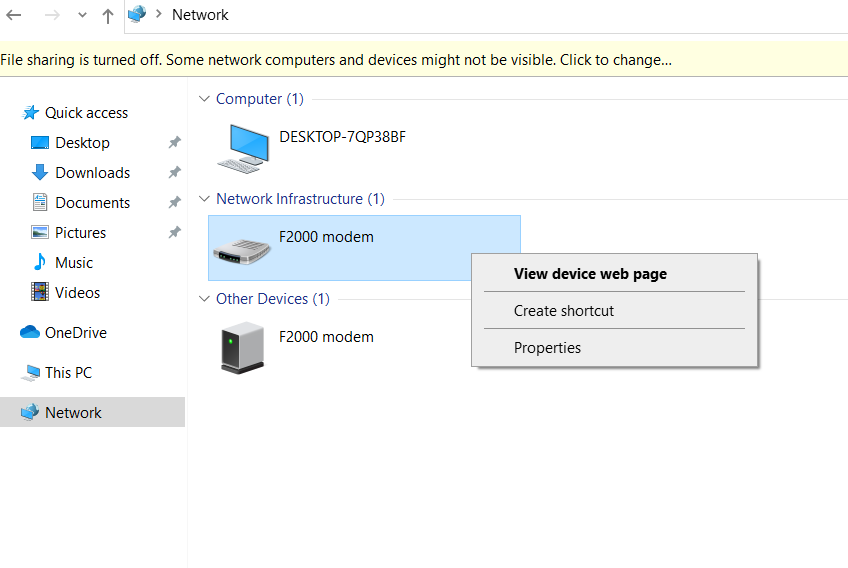
When I need to configure the F2000, I connect a laptop directly to a third LAN port. It shows up in the network of Windows 10 as follows (other OS may vary);


Sunday, 9 February 2020

Splashtop Latency Demo

A user over at unRaid Forums asked me about latency when using SpalshTop Personal to access an OSX VM running on unRaid. I promised a quick video to show it in action. Sorry about the delay!


Friday, 27 December 2019

Solved - Av Access USB prevents system boot

In a previous post, I'd detailed my setup of using a  4KEX100-KVM  to extend an unRaid VM to a very remote screen over ethernet.

This has worked out great, with one exception. With the Av Access transmitter USB plugged in to my server, the system would not post. It was necessary for me to unplug the USB, wait for post and unRaid to start booting, then plug the USB back in.

This was a chore, especially as my server sits in my attic and can be a pain to access.

I was living with the issue as thankfully I don't need to reboot too often, but in researching something else recently, I came across a known issue with some older USB devices. It turns out that some USB devices feed +5V back to the host adapter. This can result in some motherboards failing to post - my symptoms exactly.

The extreme solution is to sever the +5V wire in the USB cable (!) but before going that far, I decided to try placing a USB hub inline between the USB host adapter and the transmitter unit. Hey Presto! I can now boot and reboot without issue.

All hail the interweb.


Saturday, 24 August 2019

UNIFI: The start of something big....


'Dad, the internet's slow!'
'Dad, can you restart the Wifi?'
'Dad, will we ever have WiFi in the kitchen?'

It was getting tiresome. A few years ago, I'd augmented the ISP all-in-one modem/router/WiFi with an Archer wireless router and a couple of Huawei extenders. This was an improvement, but never a satisfactory, long-term solution.

I'd been reading a lot about the Unifi range from Ubiquity and this week bit the bullet and purchased;


The idea was to provide decent wifi throughout the house, with 2x access points connected to the Switch from which they would receive both data and power. As an added bonus, the fully managed switch also supports link aggregation, so I could leverage both ethernet ports on my recently reconstructed MediaServer8.

Despite copious amounts of reading & research, and pre-installing the Unifi Controller Docker on unRaid, setup was not as smooth as it might have been.

Thursday, 15 August 2019

VM Audio Solution

When setting up VM access over ethernet using the AV Access device, I noted that one issue was the failure of my Harman Kardon Soundsticks to work with the system. Plugging them in to the receiver USB port would result in intermittent but regular screen blanking.

A few readers suggested additional power and I purchased a USB power/data cable, but that didn't work.

Next, I tried a cheap and cheerful external USB soundcard. I plugged this into the receiver and attached some powered speakers. This worked, in that my OSX VM recognised the device immediately and could play audio, but it was annoyingly distorted - just enough crackle & pop to distract.

Next, I tried attaching the USB soundcard directly to the (passed through) USB adapter on the unRaid box. I then passed the audio out to the AV Access transmitter audio in and attached the speakers to the receiver audio out.

Hey Presto, perfect audio*. No crackles, pops, noise or distortion. The lesson here is that with this method of video/IO/audio distribution, the soundcard needs to stay upstream. My SoundSticks are now moved to another workstation where they can be attached to that VMs USB adapter directly.

My final working audio chain is;

PCIe USB Adapter -> USB Audio Card -> AV Access TX Audio In -> AV Access RX Audio Out -> Speakers

*When I say 'perfect', I mean adequate for needs in that system sounds and youtube audio plays just fine. I wouldn't be using this set up for anything close to critical listening.


Friday, 26 July 2019

Routing VMs anywhere

I'll start my saying that these things are freaking amazing!

I've been running a few VMs on my unRaid box for a while now. Specifically my main workstation (Win10 /OSX switchable), as well as some utility boxes.

One of the challenges has been physical location and signal transfer - my unRaid server resides in my attic and any VMs that required an interface (display & USB), would need to be located within the reach of a HDMI run.

This ruled out virtualising some systems, including a Win 10 / OSX dual boot hackintosh that's the main system the family uses. It's miles away from the server with no hope of running cables.

I'd toyed with HDMI over ethernet before, with little success. Recently, however, I came across the Av Access range of products...

Saturday, 15 June 2019

UnRaid Not Accessible from Windows 10 Explorer

I recently updated a Windows 10 PC to the latest and greatest through auto updates. (currently Windows 10 Pro Build 1803). After doing so, I found I could not access UnRaid either by name or IP address. (Windows explorer was showing an unspecified errorcode Ox000 )

After a bit of GoogleFu and some trial and error, the following steps worked for me;

  1. Run services.msc and set Function Discovery Resource Publication Service to automatic(and start it).
  2. Enabled SMB 1.0/CIFS File Sharing Support under Control Panel ->Programes & Features -> Turn Windows features on and off.
  3.  Run gpedit.msc and set Enable insecure guest logons to enabled (under Computer Configuration -> Administrative Templates -> Network -> Lanman Workstation.


I'm unsure if all of the above are necessary, but 3 was required for me after 1 & 2 solved the basic error. There may be other ways to solve this, the above worked for me.